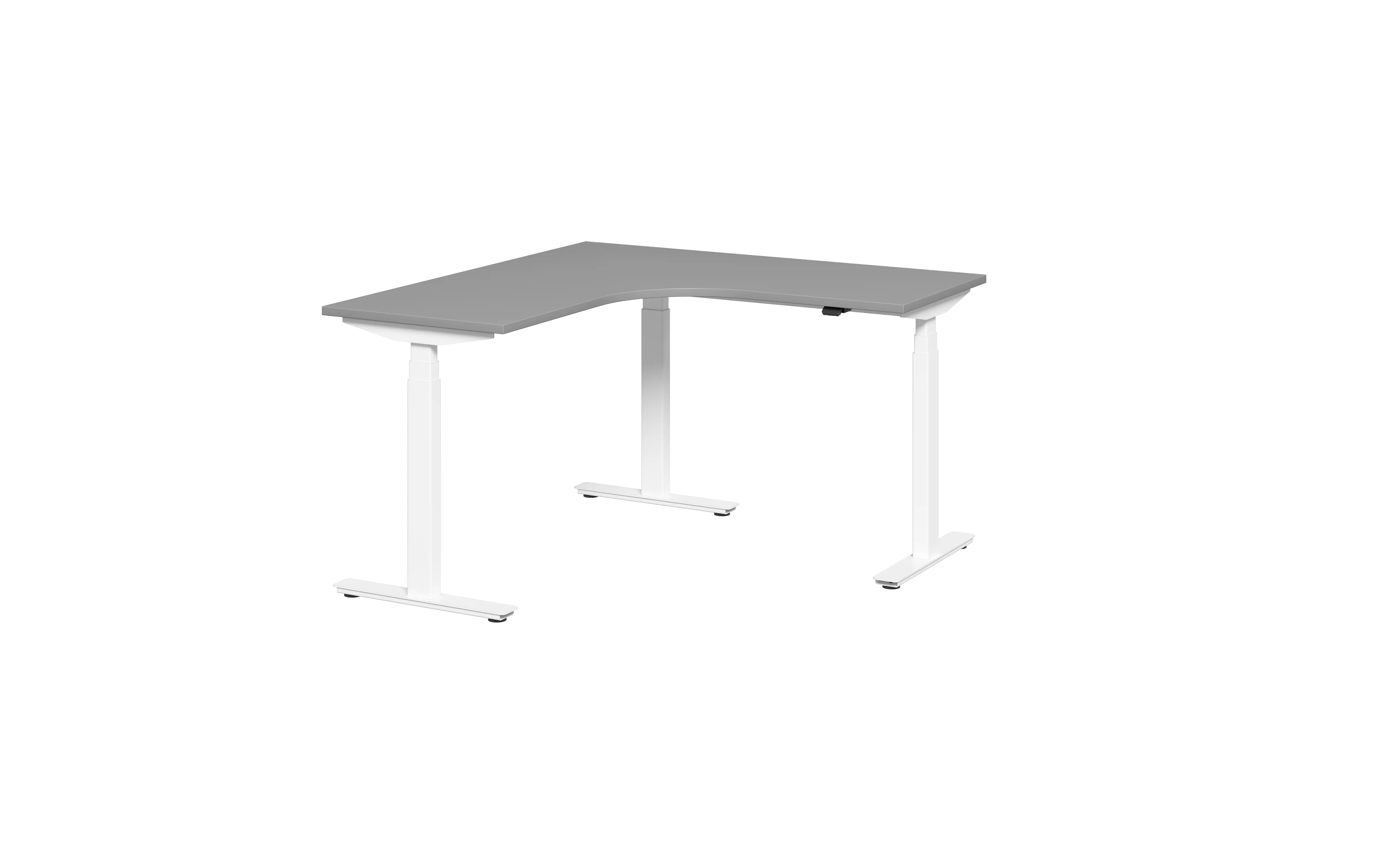
L Shaped Standing Desk with Storage: Sizes, Load and What to Check
An L-shaped standing desk solves a problem a rectangular one cannot: it puts a working surface on two walls at once, and the corner becomes usable space instead of dead space.
But the L shape also introduces decisions that straight desks do not have — which way the return points, how many legs the frame needs, and whether you are buying a complete desk or a frame you fit a top to yourself.
What makes an L-shaped desk different
A straight desk sits against one wall. An L-shaped desk wraps a corner, so the two arms serve different jobs — typically a primary workstation on the long arm and a secondary surface on the return for a second monitor, documents or a printer.
The trade-off is floor area. An L desk occupies the corner plus the depth of both arms, which in practice is 1.5 to 2 times the footprint of a straight desk of the same length. Measure the room before you fall in love with the shape.
The second difference is structural. A corner needs support, and how that support is arranged determines how much the desk moves when it is at standing height. OSHA's workstation guidance covers posture and positioning, but says nothing about frame geometry — that part is on the buyer.
Left return or right return — measure before you order
The return is the shorter arm that forms the L. It can sit on either side of the main desk, and the wrong choice means the desk will not fit the room.
Stand where you will sit, facing the wall. The return extends to your left or your right. Note which, then check three things:
- Which side the window is on — you do not want the return blocking it
- Which side the door is on — the return should not narrow the walkway
- Where the power outlets are — the return usually carries the second screen
Most manufacturers build one orientation and mirror it on request. Confirm before ordering; changing it afterwards usually means a new frame, not an adjustment.
Size guide: how much floor an L desk actually takes
Common configurations run from a compact 1200 × 1200 mm footprint up to 1800 × 1600 mm. As a rule of thumb:
- 1200 × 1200 mm — one person, one screen, tight room
- 1400 × 1400 mm — one person, dual screens, comfortable
- 1600 × 1400 mm — one person plus documents or a second seat
- 1800 × 1600 mm — two people sharing the corner, or a creative workstation
Add the chair clearance: allow at least 900 mm behind the seated position for the chair to roll back. In a corner this is where L desks fail — the return looks fine on a floor plan but leaves no room to push back. Cornell University's ergonomics research covers seated reach and clearance in more detail.
On our frames, the return top is available in 1400, 1500 or 1600 mm lengths. Confirm the depth you need at the same time — a deep return eats the walkway, and a shallow one will not take a printer.
Storage: under-desk, integrated and return-side
Storage on an L desk usually takes one of three forms.
Under-desk pedestals. The simplest option. A mobile pedestal sits under the return or the main arm and rolls out when you need it. Check that the pedestal height clears the frame's lowest position — on a sit-stand desk, the frame drops lower than a fixed desk and can foul a taller cabinet.
Integrated drawers. Drawers built into the frame or the top. Cleaner visually, but they add weight to the lifting load and cannot be removed if the desk is reconfigured.
Return-side shelving. Open shelving under the return. Good for files and printers, but it fixes the return in place — if you want the desk to move, this is the wrong choice.
Whichever you choose, add the storage weight to your load calculation before you size the frame.
3-leg or 4-leg: why the corner matters
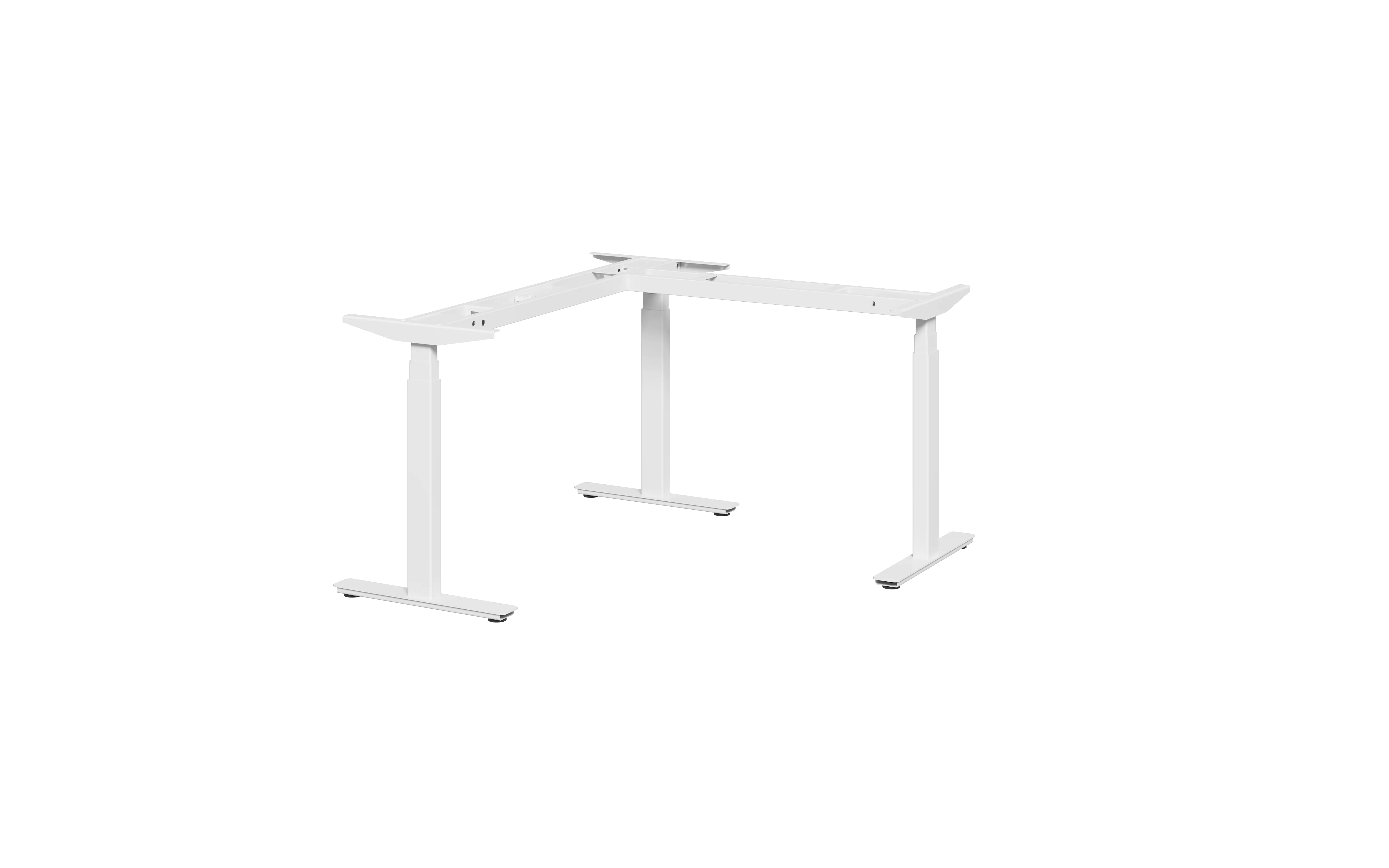
A rectangular standing desk normally uses two legs. An L-shaped desk cannot — the corner would be unsupported, and the return would flex when the desk rises.
The standard solution is a three-leg frame: two legs under the main span, one at the outer end of the return. The third leg carries the corner load and is what keeps the two arms level as the desk moves.
Four-leg frames exist for very large L desks, but they add cost and weight without solving a problem three legs do not already solve at normal sizes.
When you compare frames, ask two questions:
- Does the third leg sit at the outer end of the return, or partway along it?
- Are the three columns synchronised, or does the third leg run independently?
A frame where the legs move independently will rack — one arm rises before the other, and the top twists. Synchronised control is not a luxury on an L desk; it is the difference between a desk that works and one that does not.
What our L frames use: LINAK three-stage columns
Our BALLOON frames run LINAK three-stage lifting columns, and all three columns on the L frame are synchronised — the two arms rise and fall together, so the top does not twist.
LINAK has been building electric actuator systems since 1907; more than ten million sit-stand desks worldwide run on their systems, with production in Denmark, China, the US, Slovakia and Thailand.
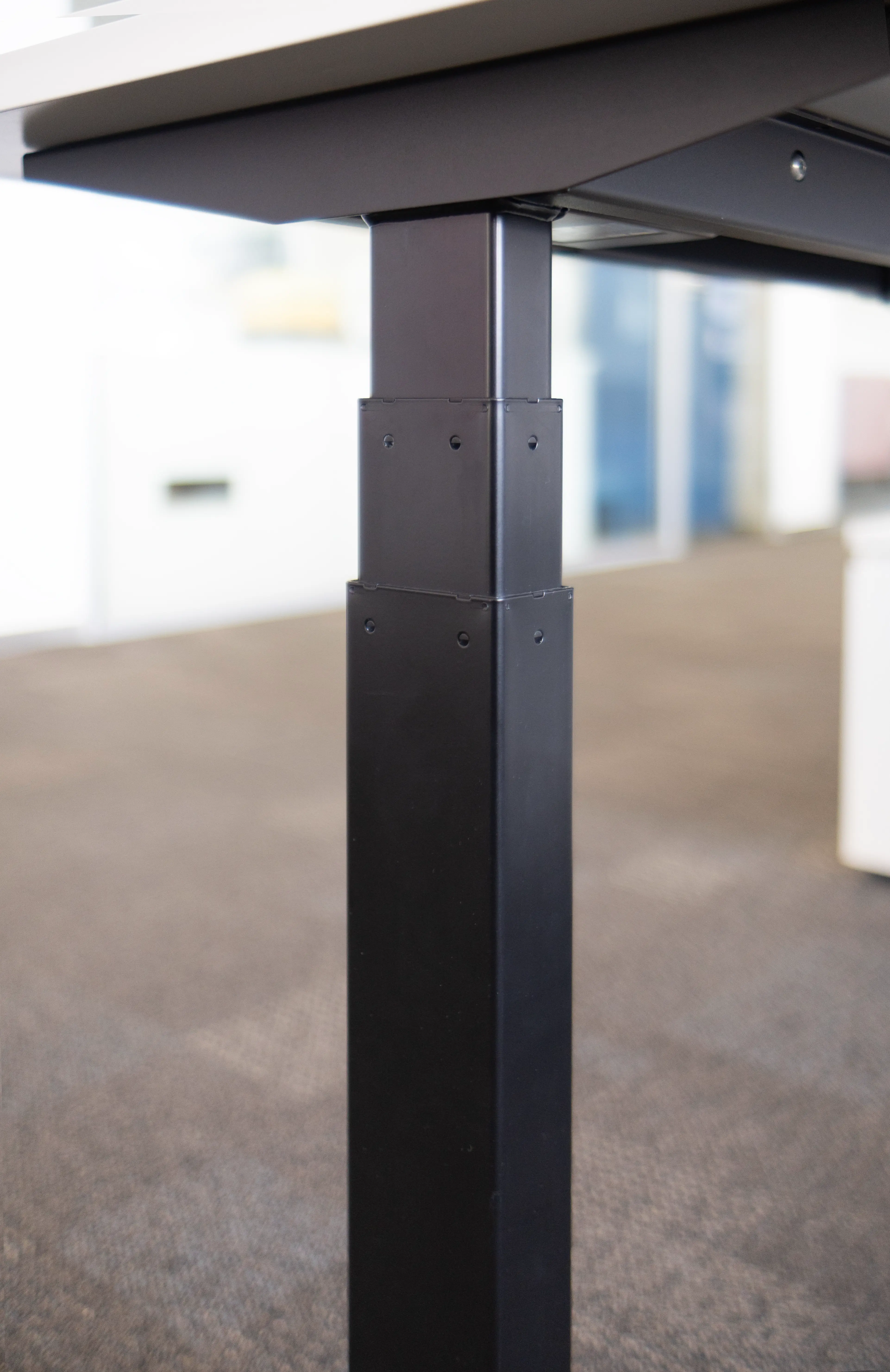
| Item | Specification |
|---|---|
| Height range | 620 – 1270 mm (±5 mm tolerance) |
| Lifting speed | 60 mm/s or 80 mm/s |
| Thrust | 1200 N or 1600 N |
| Load rating (L frame) | 125 kg |
| Noise | ≈50 dB — quieter than typing |
| Standby power | 0.1 W |
| Return top length | 1400 / 1500 / 1600 mm |
| Frame span (adjustable) | 1158 – 1758 mm, for tops 1200 – 1800 mm |
| Column control | Three columns, synchronised |
| Frame colour | Black or white as standard |
Two details are worth knowing before you specify a frame.
The foot type depends on the column position. Centre-mounted frames can be supplied with castor feet — one end on a 1.5-inch wheel, the other on an adjustable foot — or with levelling feet at both ends. Rear-mounted frames are levelling-foot only.
Anti-collision is two sensors, not one. The control system pairs a gyroscope-based sensor, which reacts to angle change at the desk edge, with a piezo sensor inside the column, which reacts to load change under the centre of the top. Edge impacts and objects beneath the desk are caught by different sensors.
The handset carries four memory positions, a height readout and a breathing light that prompts a posture change. Bluetooth is available for usage data.
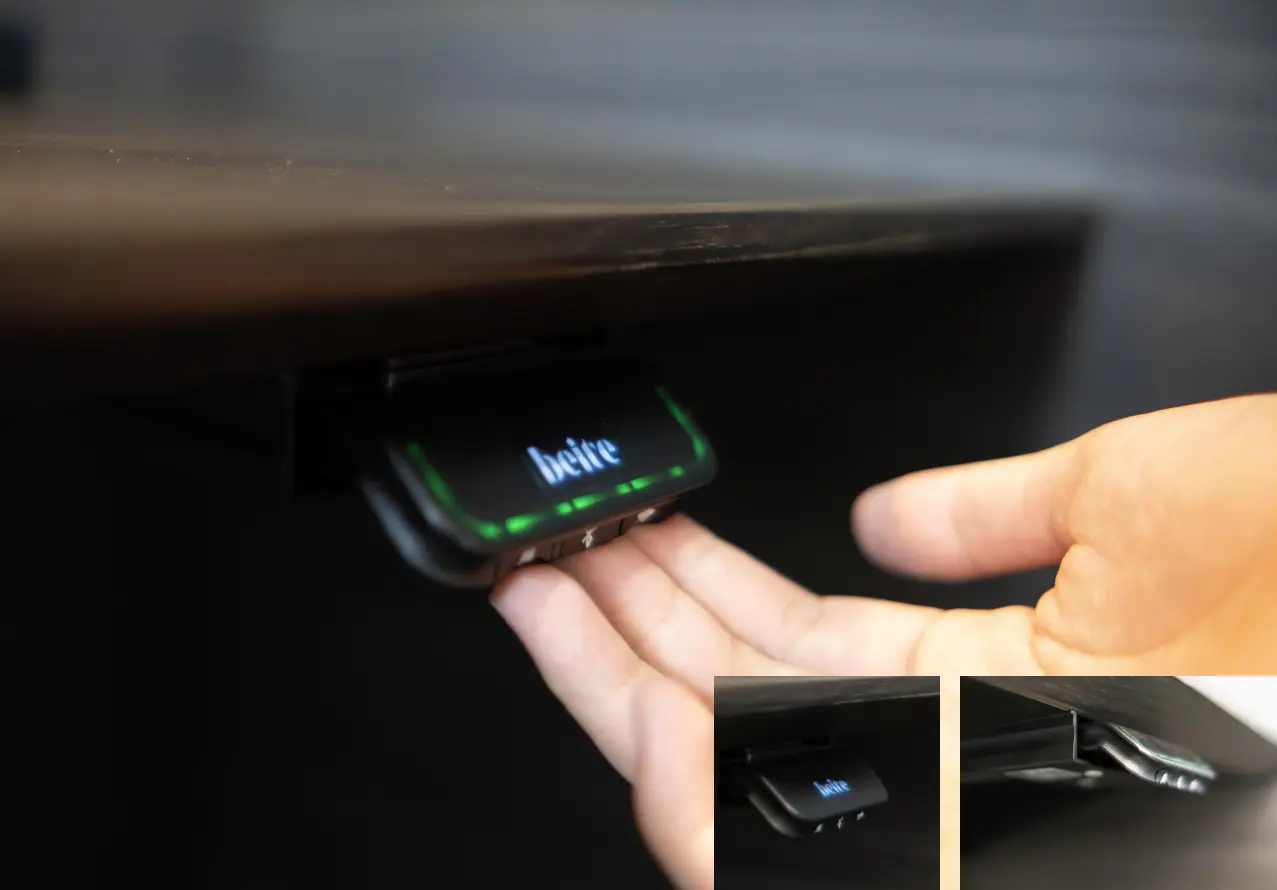
The LINAK DPI control system has taken a Red Dot Design Award (2018), a German Innovation Award (2018) and a Plus X Award (2018). Components are documented on our quality and certification page.
Load rating: static versus dynamic
Every standing desk has two load figures, and most listings only publish the flattering one.
Static load is what the frame holds at rest. Dynamic load is what the motors can actually lift. The dynamic figure is always lower, and it is the one that matters — a desk rated 120 kg static may lift only 80 kg.
Our L frames are rated at 125 kg lifting capacity. On an L desk, add up everything that rides on the frame: both desktops, monitor arms, screens, PC, dock, speakers, and any drawer unit mounted to the frame. Then leave margin — a desk running near its limit will slow down and eventually stall.
Ask for both numbers in writing. If a supplier quotes only one, they either do not know the difference or are avoiding the question. BIFMA publishes the test standards desks are measured against.
Cable management on a corner desk
A corner concentrates cables. Power, network and monitor leads all converge at the junction of the two arms, which is also where the frame's moving parts are.
Look for:
- A cable tray that runs the full length of both arms, not just the main span
- Routing that stays clear of the lifting columns — a cable that catches on a column will be cut within weeks
- Enough slack for the full height range, not just the seated position
The cheapest cable management is designed in. Retrofitting a corner desk afterwards usually means drilling the top. UK HSE display screen equipment guidance is a useful reference for how workstations should be set up around cabling and reach.
Frame only, or complete desk?
This is the decision most buying guides skip, and it changes the price more than any other choice.
A complete desk arrives with frame and top matched by the manufacturer. You get a guaranteed fit and one supplier to chase.
A frame-only kit lets you source the top locally — which matters if you want a finish that matches existing furniture, need a fire-rated board, or are fitting out a project where the joinery is already specified.
If you go frame-only, confirm four things before ordering: the top thickness range the frame accepts, the mounting hole pattern, whether a drilling template is supplied, and the maximum span between legs.
For wholesalers and project contractors, frame-only is often the better commercial model — the frame ships compact, the top is cut locally, and freight cost drops sharply. If you are also fitting out mobile or shared workstations, see our mobile standing desk guide.
What to check before you buy
- Measure the corner, both arms and the chair clearance behind the seated position
- Confirm left or right return against the room, not against a photo
- Check that the third leg sits at the outer end of the return
- Confirm the three columns are synchronised
- Ask for dynamic load, not just static
- Check the frame's lowest height — it affects what storage fits underneath
- Confirm the top thickness range and hole pattern if buying frame-only
- Ask for a cable tray that spans both arms
- Check the return depth against the walkway, not just the length
If the room also needs flexible meeting or training furniture, our folding meeting tables are built on the same reconfiguration logic.
FAQ
Is an L-shaped standing desk worth it over a straight desk?
If you use two screens or spread documents out, yes — the return adds usable surface without adding a second desk. If you work on one laptop, a straight desk is cheaper and takes less floor.
Can I use my own worktop on an L-shaped frame?
Usually yes, but confirm the thickness range, the hole pattern and whether a drilling template is included. The return top is often a different depth from the main top — check both.
Do I need a 4-leg frame?
For most home and office sizes, a synchronised 3-leg frame is enough. Four legs become relevant on very large or very deep L configurations.
What is the difference between static and dynamic load?
Static is what the desk holds at rest; dynamic is what it can lift. Dynamic is always lower and is the figure that determines whether the desk stalls.
Can an L-shaped desk be converted to a straight desk later?
On most three-leg frames, the return arm can be removed and the frame used as a straight two-leg desk. Confirm this with the supplier before buying — it is not universal.
Next step
Tell us the corner dimensions, which side the return goes and what has to sit on the desk — we will confirm the frame configuration and load rating against it. Request a quote.
Beite has been manufacturing commercial office furniture since 2007. See delivered projects for recent installations.